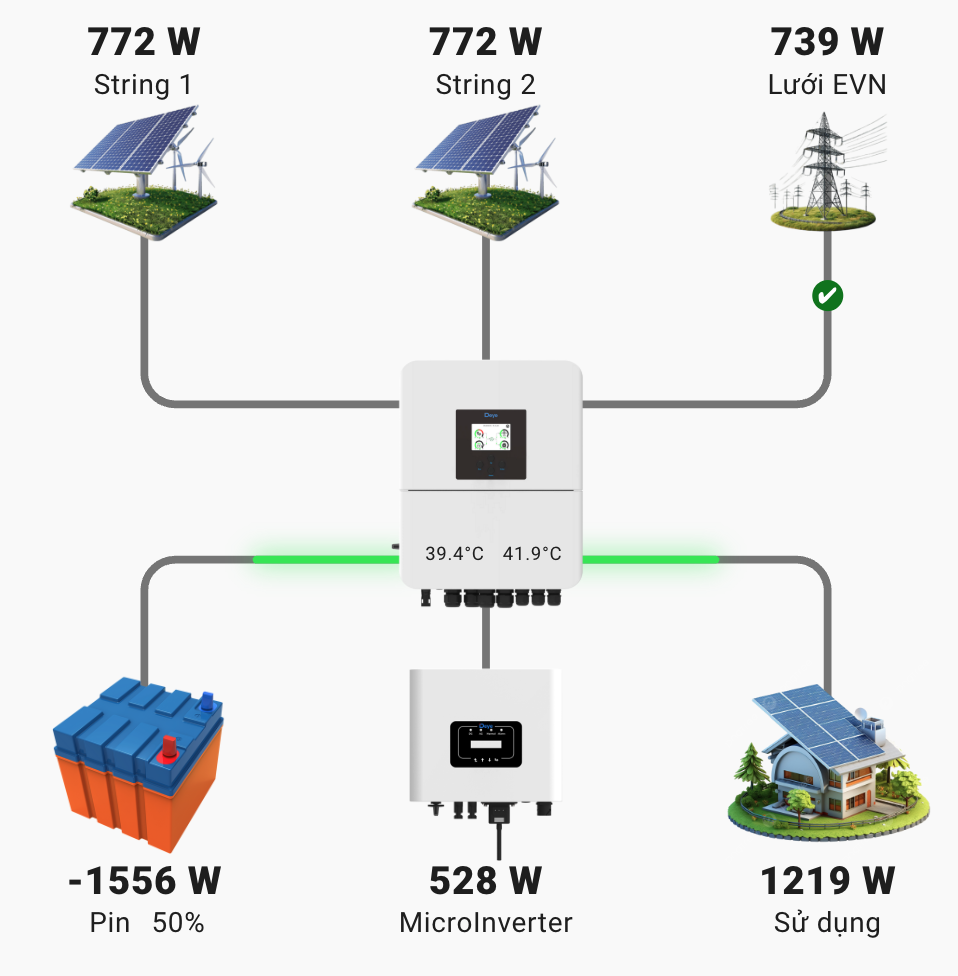
🧭 tb-energy-flow-card

🧭 tb-energy-flow-card
"Visually display solar power flow in Home Assistant. Supports inverter, grid, battery, micro inverter, load..."

🔧 Main features
- "SVG energy diagram with a fixed, visually appealing layout."
- "Displays 5 components: Solar, Grid, Battery, Micro Inverter, Load."
- "Animated power flow following the actual direction, can reverse direction for Grid and Battery."
- "Lines and highlights can have customizable colors."
- "Supports Dark mode."
- "Allows renaming, changing icons, images, font size, and the position of each component."
- "Supports a central Inverter image with customizable size."
⚙️ Installation
"Go to the HACS section of your Home Assistant, click the three dots on the right, and select Add custom repository"

"Paste this link into the repository field with the type set to Dashboard. Then click Add"
https://github.com/tongtbgl/tb-energy-flow-card
"After adding, search for tb energy flow card and it will appear for you to download."
Sample code
type: custom:tb-energy-flow-card
show_micro: true
show_solar2: true
solar: sensor.esp_inverter_pv1_power
solar2: sensor.esp_inverter_pv2_power
grid: sensor.esp_inverter_grid_ct_power
battery: sensor.esp_inverter_battery_power
entity_micro: sensor.esp_inverter_aux_power
load: sensor.esp_inverter_load_power
soc: sensor.soc_giao_tiep
grid_status: binary_sensor.esp_inverter_grid_connected_status
grid_status_x: 520
grid_status_y: 180
name_solar: String 1
name_solar2: String 2
name_grid: EVN Grid
name_battery: Battery
name_micro: Deye OnGrid
name_load: Consumption
image_solar: >-
  https://png.pngtree.com/png-vector/20240720/ourmid/pngtree-sustainable-solar-water-pump-on-transparent-background-png-image_12963933.png
image_solar2: >-
  https://png.pngtree.com/png-vector/20240720/ourmid/pngtree-sustainable-solar-water-pump-on-transparent-background-png-image_12963933.png
image_grid: >-
  https://png.pngtree.com/png-vector/20250105/ourmid/pngtree-d-model-of-a-steel-transmission-tower-with-power-lines-on-png-image_15054625.png
image_battery: https://bachtran.net/ha/img/battery.png
image_micro: https://tpenergy.com.vn/wp-content/uploads/2023/10/3-1-1.png
image_load: https://bachtran.net/ha/img/home.png
inverter_image: https://bachtran.net/wp-content/uploads/2025/07/deye1.png
line_color: "#ededed"
line_width: 3
dot_color: "#34eb49"
invert_grid: true
invert_battery: true
decimal_precision: false
dot_size: 8
animation_duration: auto
image_y_offset_top: -50
image_y_offset_bottom: -95
image_size_top: 100
image_size_bottom: 150
inverter_image_width: 800
inverter_image_height: 200
label_y_offset_top: -50
value_y_offset_top: -75
label_y_offset_bottom: 90
value_y_offset_bottom: 65
font_size_label: 18
font_size_value: 25
font_weight_value: 1000
temp:
  ac: sensor.esp_inverter_radiator_temperature
  dc: sensor.esp_inverter_dc_transformer_temperature
temp_position:
  ac:
    x: 380
    "y": 330
  dc:
    x: 220
    "y": 330
temp_font:
  size: 12
  weight: normal
Other display styles
With 2 PV strings

"The way to do this is to change the image link and entity of the micro inverter to the image of the PV String with the PV2 entity"
Without a micro inverter

"To do this, change show_micro: true to show_micro: false"
Customization
"You can customize the following parameters"
| Option | Description |
|---|---|
entities |
Define the entities: solar, grid, battery, micro, load |
name |
Display name for each component |
invert_grid |
Reverse the animation direction of the grid power flow |
invert_battery |
Reverse the animation direction of the battery |
line_color |
Color of the power lines (default: orange) |
dot_color |
Color of the dots |
dot_size |
Size of the dots |
image_y_offset_top |
Y-axis offset for the upper image group |
image_y_offset_bottom |
Y-axis offset for the lower image group |
image_size_top |
Image size for the upper group |
image_size_bottom |
Image size for the lower group |
font_size_label |
Font size of labels |
font_size_value |
Font size of values |
font_weight_value |
Font weight of numeric values |
decimal_precision |
Number of decimal places to display |
show_micro |
Show the micro inverter |
show_solar2 |
Show an additional PV string |
Support me so I have more motivation to continue developing:
"https://bachtran.net/donate/ Thank you all"