Build an AI Camera to Enhance Your Home Security, Reduce Latency, and Eliminate False Alerts
Common security cameras (IMOU, Ezviz, etc.) usually only perform basic detection such as human/motion detection. When you integrate them into Home Assistant for automation, you will often run into quite a lot of false alerts.
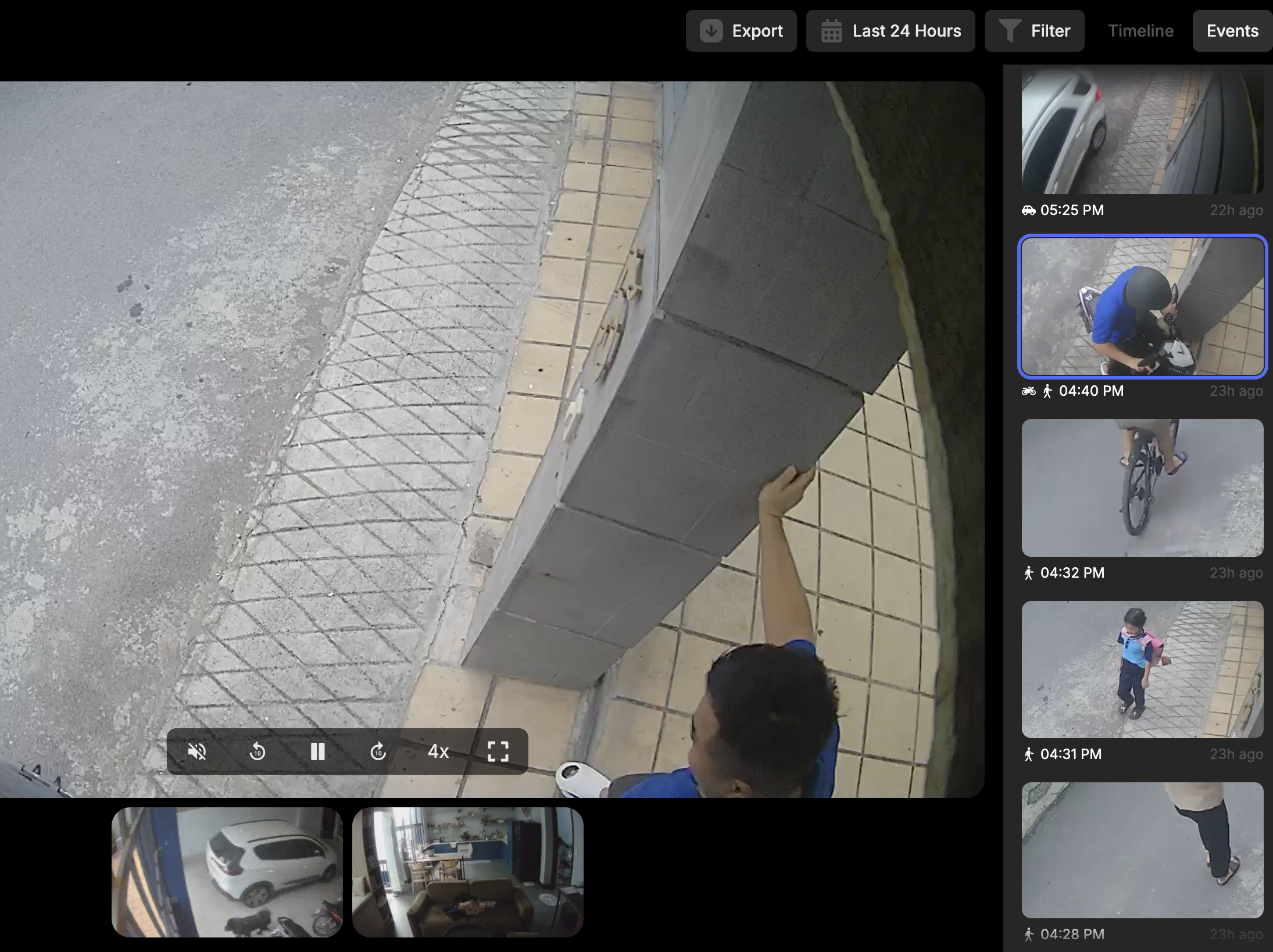
Many homelab users use Frigate as a local AI layer first, which works very well because it is fast and you have full control over your data. However, Frigate still mainly detects based on object labels (person, car, dog...), and is not strong at understanding professional/occupational context.
Example: there is a person standing in front of your gate, but is that a guest, a neighbor, or a delivery driver?
The solution in this article is to stack recognition layers:
- Frigate: quickly filter events that contain a
person. - LLM in Home Assistant: perform deeper context analysis to count delivery drivers.
- Counter sensor: store the number of delivery drivers to trigger notification automations.
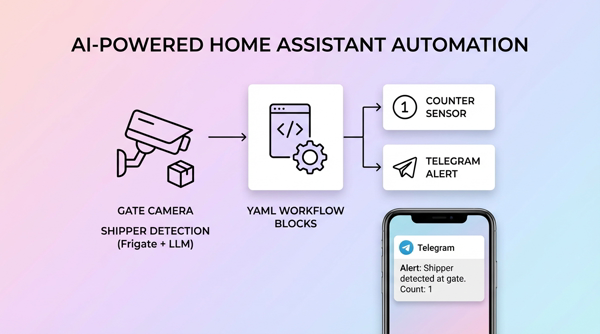
Deployment architecture
Execution flow:
- Frigate publishes events to the MQTT topic
frigate/events. - Automation 1 in HA receives the event and only keeps events with the label
person. - HA calls
ai_task.generate_data(Gemini Flash) to analyze the gate camera. - The LLM returns a string containing the number of delivery drivers.
- The automation parses the number and writes it to
counter.shipper_count. - Automation 2 monitors
counter.shipper_count > 0to send a Telegram message. - The counter resets after 5 minutes.
Part 1: Prepare required entities and integrations
1) Required
- Frigate + MQTT already running.
- Camera entity in Home Assistant (for example
camera.gate_camera). - AI Task integration in HA (to call the
ai_task.generate_dataservice). - Telegram bot integration (if you want to send notifications as in the example).
2) Create a counter sensor to store the number of delivery drivers
Go to Settings → Devices & Services → Helpers → Create Helper → Counter
- Name:
shipper_count - Entity ID:
counter.shipper_count - Initial value:
0 - Step:
1
If you configure YAML directly, add this under thecounter:section inconfiguration.yaml.
Part 2: Create an automation to detect delivery drivers (AI layer)
You can create this via the UI Automation Editor or by pasting YAML. Below is a version standardized according to the real-world flow you are using.
alias: Detect human delivery driver at the gate
description: ""
triggers:
  - topic: frigate/events
    trigger: mqtt
conditions:
  - condition: template
    value_template: "{{ trigger.payload_json['after']['label'] == 'person' }}"
actions:
  - action: ai_task.generate_data
    response_variable: shipper_count
    data:
      instructions: >-
        You are an image analysis assistant.

        Task: Count the number of delivery drivers (people delivering goods)
        standing in front of the gate in the image.

        Rules:
        - Only rely on occupational cues: delivery uniforms,
          helmets with logos, courier-branded jackets,
          delivery bags, cargo boxes, delivery motorbikes,
          and delivery/receiving behavior.
        - Do not identify personal identities.
        - Only count people with clear signs of being delivery drivers.
        - Ignore passersby or people without delivery-driver signs.
        - If the gate is unclear or not visible due to camera angle,
          only count delivery drivers within the camera's visible area.
        - Return exactly one line in the format: "shipper_count: <number>"

        Output: Only one single line, no additional line breaks.
      entity_id: ai_task.gemini_flash
      attachments:
        media_content_id: media-source://camera/camera.gate_camera
        media_content_type: application/vnd.apple.mpegurl
        metadata:
          title: Gate Camera
          thumbnail: /api/camera_proxy/camera.gate_camera
          media_class: video
          children_media_class:
          navigateIds:
            - {}
            - media_content_type: app
              media_content_id: media-source://camera
      task_name: Camera AI

  - if:
      - condition: template
        value_template: >-
          {{ (shipper_count['data'] | regex_findall_index('([0-9]+)', 0) | int(0)) > 0 }}
    then:
      - action: counter.set_value
        data:
          value: >-
            {{ shipper_count['data'] | regex_findall_index('([0-9]+)', 0) | int(0) }}
        target:
          entity_id:
            - counter.shipper_count

      - action: camera.snapshot
        data:
          filename: /media/snapshots/gate_snapshot1.jpg
        target:
          entity_id: camera.gate_camera

      - delay:
          minutes: 5

      - action: counter.reset
        data: {}
        target:
          entity_id:
            - counter.shipper_count
mode: single
Because an LLM can return flexible text, using the regex ([0-9]+) is a simple and stable way to avoid parsing errors.Part 3: Create an automation to notify when there is a delivery driver
alias: Notify when a delivery driver is standing at the gate
description: ""
triggers:
  - trigger: numeric_state
    entity_id:
      - counter.shipper_count
    above: 0
conditions: []
actions:
  - action: telegram_bot.send_photo
    data:
      caption: The AI detected a delivery driver standing at the gate
      file: /media/snapshots/gate_snapshot1.jpg
      inline_keyboard:
        - Take another snapshot of gate and garage cameras:/snapshot
mode: single
You can replace telegram_bot.send_photo with:
notify.mobile_app_<phone_name>if you want push notifications to your phone.tts.speakif you want a speaker in the house to announce it.
Part 4: Test step by step
Test 1: Check events from Frigate
- Go to Developer Tools → MQTT → Listen to a topic
- Enter
frigate/events - Walk through the camera area to see whether the payload is being published.
Test 2: Check whether the AI service runs successfully
- Go to Developer Tools → Actions
- Test run
ai_task.generate_datawith the gate camera. - Verify that the response includes a number (for example
shipper_count: 1).
Test 3: Check the counter
- Go to States and see whether
counter.shipper_countchanges to > 0 when there is a delivery driver. - After 5 minutes, the counter should automatically reset back to 0.
Test 4: Check Telegram notification
- Make sure the bot has permission to send images to the chat/group.
- Check that the file
/media/snapshots/gate_snapshot1.jpghas been created.
Tips to reduce false alerts and optimize cost
- Only call the LLM after the local filter layer (
label == person). - Use a lightweight model (
gemini_flash) for near real-time tasks. - Standardize the output prompt to make parsing stable.
- Add a cooldown (delay/reset counter) to avoid notification spam.
- Only send necessary images/clips to reduce data usage and protect privacy.
Quick troubleshooting
1) Error parsing numbers from the LLM
Symptom: the counter does not increase.
How to fix:
- Temporarily output
{{ shipper_count['data'] }}to logs/notifications to see the actual response. - Keep the prompt strict to enforce 1-line format + regex fallback
([0-9]+).
2) Not receiving images on Telegram
- Check the path
/media/snapshots/gate_snapshot1.jpg. - Make sure the detection automation reaches the
camera.snapshotstep.
3) Automation not triggering
- Verify the MQTT topic is exactly
frigate/events. - Check whether the payload contains
after.label. - Confirm that the Frigate camera and the camera entity name in HA are mapped correctly.
Conclusion
The strength of this model is not replacing Frigate with an LLM, but combining two layers:
- Frigate handles fast and inexpensive processing locally.
- The LLM adds contextual understanding to make better decisions.
When the pipeline is built correctly, you will drastically reduce false alerts and can build smarter automations such as opening the gate for delivery drivers, creating a delivery history, or analyzing behavior at the gate.