Connect Solis Inverter to Home Assistant and Use Weather Forecasts to Optimize Solar Energy
Build a Solis Inverter dashboard in Home Assistant to monitor solar power, plan daily energy use, and create smarter operating alerts.
I do not want to open the inverter app just to see whether the house is using solar power or pulling from the grid. With Home Assistant, I can put Solis data, house load, grid power, and weather forecasts on one screen.
The result is a dashboard card that answers three questions immediately:
- How much power is the house using?
- How much solar power is being generated?
- Is the grid filling the gap, or is the system producing enough?
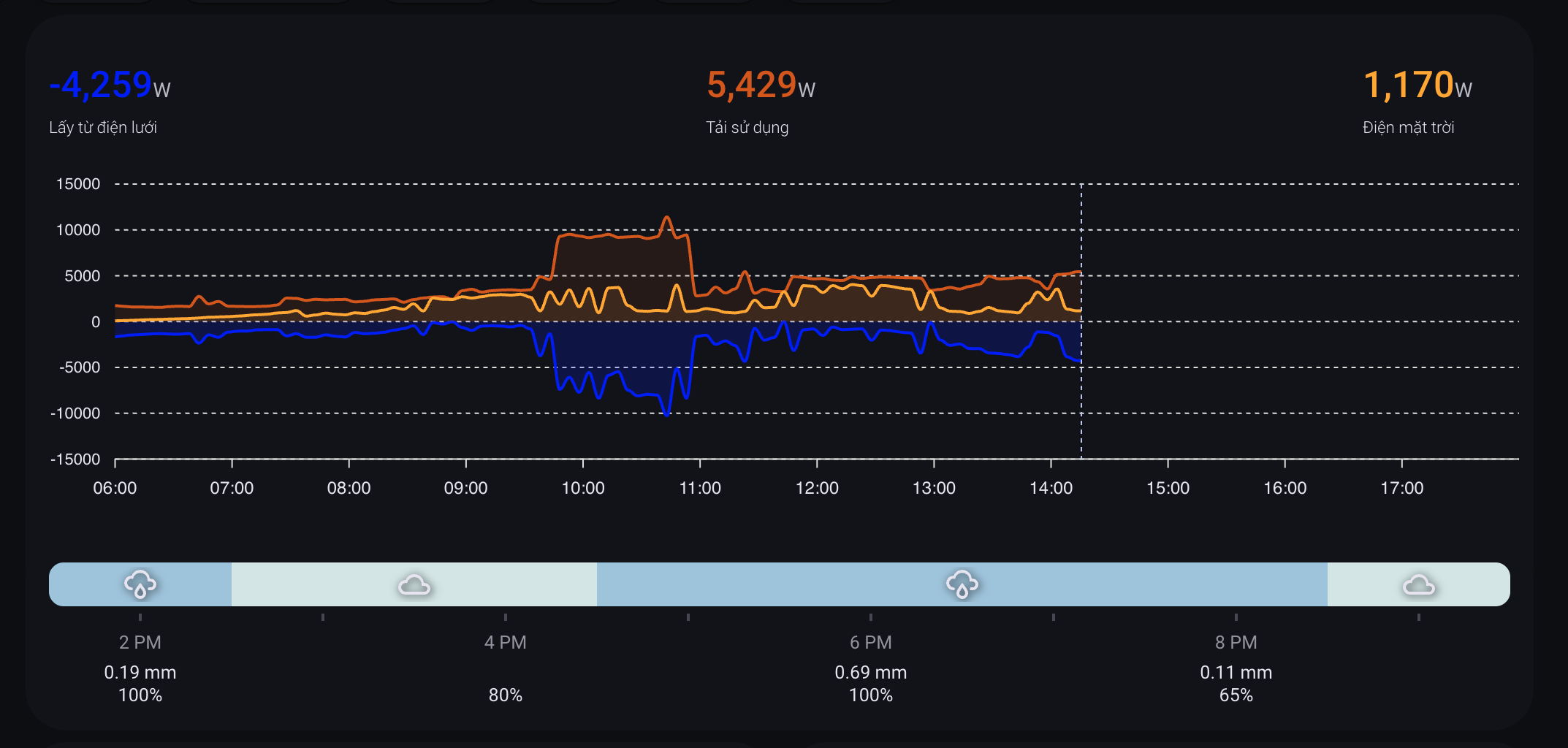
It is important to separate two things. The card and weather forecast mostly help me understand the day and plan around it: when to charge batteries, when to move flexible loads, and when to avoid heavy consumption. The automation value is not the card itself. It comes from the sensors behind it: alerts when power use is inefficient, reminders or actions when there is surplus solar power, and automatic cooling when the Solis inverter gets too hot.
Overall Architecture
SolisCloud API
    |
    v
Solis Inverter integration
    |
    v
Solis sensors in Home Assistant
    |                         \
    |                          \
    v                           v
Dashboard + forecast          Alerts / surplus solar use / inverter cooling
    ^                           ^
    |                           |
weather.openweathermap --------+
    ^
    |
OpenWeatherMap

Sensor-based automations
    |
    v
Inefficient-load alerts / battery charger / Solis cooling fan
In my real setup, Solis is connected through the custom integration Solis Inverter, domain solis, version 4.0.1. The integration uses cloud_polling and points to hultenvp/solis-sensor.
In plain terms: Home Assistant reads data from SolisCloud, exposes it as sensors, and Lovelace uses those sensors to draw the dashboard.
Install The Solis Integration
The quickest path is to install the Solis custom integration through HACS:
- Open HACS.
- Add repository
https://github.com/hultenvp/solis-sensor. - Choose category
Integration. - Restart Home Assistant.
- Go to Settings -> Devices & services -> Add integration -> Solis Inverter.
Request The SolisCloud API Key
The integration needs a SolisCloud API key to read inverter data reliably. This key is usually not shown automatically in a normal account, so you need to email Solis and ask them to enable or provide API access.
Email [email protected] with the full inverter details from your Solis/SolisCloud portal. You can find these details in the plant or inverter information screens.
- Whether you are the end customer or installer.
- Inverter Serial Number.
- Plant ID or Plant Name.
- Installation date, if available.
- Country/region.
- The SolisCloud account email that manages the system.
The email can be short: explain that you use SolisCloud, want to connect inverter data to Home Assistant through the integration, and need an API key/API access for the matching plant or inverter. Include the serial number and plant ID so support can identify the correct system.
After the integration is connected, the important entities look like this:
sensor.solis_power_grid_total_power      # Grid power, W
sensor.solis_total_consumption_power     # Total house load, W
sensor.solis_ac_output_total_power       # Solar AC output, W
sensor.solis_energy_today                # Solar energy today, kWh
sensor.solis_daily_grid_energy_purchased # Grid energy purchased today, kWh
sensor.solis_daily_on_grid_energy        # Energy exported to grid today, kWh
sensor.solis_temperature                 # Inverter temperature
One important detail: the sign of sensor.solis_power_grid_total_power depends on how the integration exposes your inverter data. In my setup, a negative value means the house is pulling power from the grid. A live check returned:
sensor.solis_power_grid_total_power: -3980 W
sensor.solis_total_consumption_power: 4820 W
sensor.solis_ac_output_total_power: 840 W
sensor.solis_energy_today: 14.8 kWh
sensor.solis_temperature: 48.7 °C
Add The Data To Energy Dashboard
Configure the Home Assistant Energy Dashboard before building the prettier Lovelace dashboard. It gives you long-term statistics.
In my setup:
solar:
  stat_energy_from: sensor.solis_energy_today

grid:
  flow_from:
    stat_energy_from: sensor.solis_daily_grid_energy_purchased
  flow_to:
    stat_energy_to: sensor.solis_daily_on_grid_energy

battery:
  stat_energy_from: sensor.battery_discharged
  stat_energy_to: sensor.tong_sac_pin_luu_tru
You can configure this in the UI under Settings -> Dashboards -> Energy.
The Lovelace Card From The Screenshot
The card is built from two custom cards:
custom:apexcharts-cardfor the three power curvescustom:hourly-weatherfor hourly rain/cloud forecast
These resources are loaded through HACS:
/hacsfiles/apexcharts-card/apexcharts-card.js
/hacsfiles/lovelace-hourly-weather/hourly-weather.js
/hacsfiles/stack-in-card/stack-in-card.js
This is a simplified teaching version of my real Lovelace config:
type: custom:stack-in-card
mode: vertical
cards:
  - type: custom:apexcharts-card
    apex_config:
      legend:
        show: false
      chart:
        height: 250px
    header:
      show: true
      show_states: true
      colorize_states: true
    all_series_config:
      extend_to: now
      float_precision: 2
      stroke_width: 2
      opacity: 0.3
      type: area
    graph_span: 12h
    span:
      start: day
      offset: +6h
    hours_12: false
    now:
      show: true
      label: ''
    series:
      - entity: sensor.solis_power_grid_total_power
        name: Grid
        color: blue
        opacity: 0.1
        color_threshold:
          - value: -1
            color: blue
            opacity: 0.2
          - value: 1
            color: red
      - entity: sensor.solis_total_consumption_power
        name: Home load
        color: '#d35400'
        opacity: 0.1
        float_precision: 0
      - entity: sensor.solis_ac_output_total_power
        name: Solar
        color: orange
        opacity: 0.1

  - type: custom:hourly-weather
    entity: weather.openweathermap
    name: ''
    show_precipitation_probability: true
    show_precipitation_amounts: true
    hide_temperatures: true
    hide_hours: false
    round_temperatures: true
    icon_fill: single
    icons: true
    show_wind: 'false'
    show_date: 'false'
    num_segments: '8'
    colors:
      sunny: orange
      partlycloudy: lightyellow
      rainy: '#9EC4DD'
      cloudy: '#D3E5E4'
      exceptional: red
The useful part is that the power graph and the weather forecast sit together. When the solar curve drops and the weather strip shows rain or heavy clouds, I know the inverter is not broken. The sky is simply not helping.
Weather Data
I use OpenWeatherMap in Home Assistant. The useful entities are:
weather.openweathermap
sensor.openweathermap_weather
sensor.openweathermap_cloud_coverage
sensor.openweathermap_rain
sensor.openweathermap_precipitation_kind
sensor.openweathermap_feels_like_temperature
sensor.openweathermap_humidity
Live state during verification:
weather.openweathermap: cloudy
sensor.openweathermap_cloud_coverage: 100 %
sensor.openweathermap_rain: 0 mm/h
sensor.openweathermap_weather: mây đen u ám
For hourly-weather, Home Assistant reads hourly forecast from weather.openweathermap. A sample forecast:
- datetime: '2026-06-13T07:00:00+00:00'
  condition: rainy
  temperature: 33.4
  precipitation: 0.19
  precipitation_probability: 100
  cloud_coverage: 100
- datetime: '2026-06-13T08:00:00+00:00'
  condition: cloudy
  temperature: 33.0
  precipitation: 0
  precipitation_probability: 80
  cloud_coverage: 100
This is where Home Assistant becomes more useful than the inverter app. The inverter app tells me what the inverter is doing. Home Assistant helps me decide what to do next during the day.
The Real Automation Lives In The Sensors
The automations here are not about "automating the dashboard." The dashboard is only the display layer. The real value is that Home Assistant turns Solis data into operating signals:
- If the house still buys a lot of grid power during sunny hours, Home Assistant can warn me that power use is inefficient.
- If there is enough surplus solar power for long enough, Home Assistant can suggest or activate flexible loads such as battery charging, EV charging, or the washer.
- If the inverter gets hot and starts losing efficiency, Home Assistant can turn on an external fan and turn it off again after the temperature drops.
Use Surplus Solar Power
Once real-time sensors are available, automations can help use surplus solar power. For example, this automation turns the battery charger on when solar output is good enough:
alias: Turn ON Charger when sun raise
trigger:
  - platform: numeric_state
    entity_id: sensor.solis_power_grid_total_power
    above: -100
    for: '00:03:00'
  - platform: time
    at: '10:00:00'
condition:
  - condition: time
    after: '07:30:00'
    before: '17:00:00'
  - condition: state
    entity_id: switch.battery_charger_switch_1
    state: 'off'
  - condition: numeric_state
    entity_id: sensor.battery_total_voltage
    below: 26.2
action:
  - service: switch.turn_on
    target:
      entity_id:
        - switch.battery_charger_switch_1
        - switch.powr_powr320
The reverse automation turns the charger off if the house pulls too much from the grid for too long:
alias: Turn OFF Charger when sun down
trigger:
  - platform: numeric_state
    entity_id: sensor.solis_power_grid_total_power
    below: -700
    for: '00:10:00'
condition:
  - condition: state
    entity_id: switch.battery_charger_switch_1
    state: 'on'
  - condition: numeric_state
    entity_id: sensor.solis_power_grid_total_power
    below: -500
action:
  - service: switch.turn_off
    target:
      entity_id: switch.battery_charger_switch_1
The key detail is for. Do not turn heavy loads on or off because of a short cloud passing over the panels.
Combine Forecast With Daily Decisions
Real-time sensors answer: do I have enough solar power now?
Weather forecast answers: should I use power now, or wait?
A simple helper can look like this:
template:
  - sensor:
      - name: Solar Use Priority
        state: >
          {% set grid = states('sensor.solis_power_grid_total_power') | float(0) %}
          {% set pv = states('sensor.solis_ac_output_total_power') | float(0) %}
          {% set cloud = states('sensor.openweathermap_cloud_coverage') | float(100) %}
          {% set rain = states('sensor.openweathermap_rain') | float(0) %}

          {% if grid > -100 and pv > 1500 and cloud < 70 and rain == 0 %}
            high
          {% elif grid > -500 and pv > 800 %}
            medium
          {% else %}
            low
          {% endif %}
Then flexible-load automations can use that priority:
alias: Suggest flexible loads when solar is good
trigger:
  - platform: state
    entity_id: sensor.solar_use_priority
    to:
      - high
      - medium
condition:
  - condition: time
    after: '09:30:00'
    before: '15:30:00'
action:
  - service: notify.mobile_app_your_phone
    data:
      title: Good time to use solar power
      message: Solar output is good. Consider running the washer, charging the EV, or cooling the house.
If you want Home Assistant to actually turn devices on, add a power buffer. For a 1500 W load, I would only turn it on when surplus is around 1800-2200 W and stable for at least 10 minutes.
Inefficient Power-Use Alerts
Another automation group warns me when the house is using power inefficiently. For example, an AC or another large load may be causing the house to pull too much from the grid while there is still usable daylight:
alias: AC suggestion based on solar power
trigger:
  - platform: numeric_state
    entity_id: sensor.solis_power_grid_total_power
    below: -2000
    for: '00:15:00'
  - platform: numeric_state
    entity_id: sensor.solis_power_grid_total_power
    above: -100
    for: '00:15:00'
condition:
  - condition: time
    after: '10:00:00'
    before: '16:00:00'
  - condition: state
    entity_id: person.your_person
    state: home
action:
  - choose:
      - conditions:
          - condition: numeric_state
            entity_id: sensor.solis_power_grid_total_power
            below: -2000
        sequence:
          - service: notify.mobile_app_your_phone
            data:
              title: Consider turning off the AC
              message: The house has been pulling a lot from the grid for more than 15 minutes.
      - conditions:
          - condition: numeric_state
            entity_id: sensor.solis_power_grid_total_power
            above: -100
        sequence:
          - service: notify.mobile_app_your_phone
            data:
              title: Good time to run the AC
              message: Solar output is carrying the house load well.
I prefer this group as alerts and suggestions first, not as a fully automatic AC controller. Large loads should have a human confirmation layer until you fully understand the behavior of your house.
Cool The Inverter
A small but practical automation is turning on a fan when the inverter gets hot. Solis does not include an internal fan, partly to avoid noise, so high temperature can reduce inverter efficiency. An external fan controlled by Home Assistant cools it down quickly without having to run the fan all day:
alias: Cool solar inverter
trigger:
  - platform: numeric_state
    entity_id: sensor.solis_temperature
    above: 60
  - platform: numeric_state
    entity_id: sensor.solis_temperature
    below: 45
action:
  - choose:
      - conditions:
          - condition: numeric_state
            entity_id: sensor.solis_temperature
            below: 60
        sequence:
          - service: fan.turn_off
            target:
              entity_id: fan.quat_lam_mat_switch_1
      - conditions:
          - condition: numeric_state
            entity_id: sensor.solis_temperature
            above: 45
        sequence:
          - service: fan.turn_on
            target:
              entity_id: fan.quat_lam_mat_switch_1
You can tune this to turn on above 60°C and turn off below 45°C. That creates hysteresis and avoids rapid switching around a single threshold.
Daily AI Energy Report
Another useful idea is to use conversation.process to write a daily energy report. The input includes:
sensor.solis_energy_today: solar productionsensor.evn_sun_hours_energy_today: grid energy bought during sunny hoursweather.openweathermap: tomorrow's weather
Prompt idea:
action: conversation.process
data:
  agent_id: conversation.your_ai_agent
  language: vi
  text: >
    You are a strict home energy manager.

    Data:
    1. Solar: {{ states('sensor.solis_energy_today') | float(0) | round(1) }} kWh
    2. Grid bought during sunny hours: {{ states('sensor.evn_sun_hours_energy_today') | float(0) | round(1) }} kWh
    3. Tomorrow weather: {{ states('weather.openweathermap') }}

    Write a short Vietnamese report.
    If grid usage during sunny hours is high, remind me to move loads into solar hours.
This is the most valuable part of Home Assistant for me: it does not only display energy data; it turns data into daily operating advice.
How To Verify
Open Developer Tools -> States and check:
sensor.solis_power_grid_total_power
sensor.solis_total_consumption_power
sensor.solis_ac_output_total_power
sensor.solis_energy_today
weather.openweathermap
sensor.openweathermap_cloud_coverage
sensor.openweathermap_rain
If the card does not render:
- Check that HACS installed
apexcharts-card,hourly-weather, andstack-in-card. - Open Settings -> Dashboards -> Resources and confirm the JS resources are loaded.
- Confirm the entity IDs match your own system.
- If Solis sensors are
unknown, check SolisCloud credentials and integration logs. - If forecast data is missing, call
weather.get_forecastswith typehourly.
Conclusion
The inverter app usually tells me how much power the system is producing. Home Assistant gives me a higher-level operating view: how the house is using power, what the weather is about to do, and which loads should run during sunny hours.
With this dashboard, I can decide:
- Should I turn on the battery charger?
- Should I run the washer or charge the EV now?
- Should I reduce or turn off a large load because the house is pulling too much from the grid?
- Is the inverter hot enough to need cooling?
That is the move from "monitoring solar numbers" to "operating the house around solar power": the card helps me read the day and plan, while automations use the same sensors to warn me, use surplus power, and protect inverter efficiency.