Optimizing Wi-Fi Mesh: Why Maximum Power and Highest Channels Aren't Always the Best
When installing Wi-Fi Mesh, I used to think very simply: if the house has many nodes, just set the transmit power to maximum for the signal to reach as far as possible. I also chose the highest channel or a channel rarely used by neighbors, thinking this would minimize interference and make the network more stable.
The reality is quite the opposite. After a period of use, my home devices were very erratic: sometimes the signal looked strong, sometimes it dropped quickly, some devices stayed in one place but kept hopping between nodes continuously, and sometimes they should have switched to a closer node but kept clinging to a farther one. It felt like the Wi-Fi was strong one moment and weak the next, while the number of signal bars didn't clarify where the problem lay.
The issues I paid little attention to were transmit power and broadcasting channel.
Strong signal does not mean a good connection
Wi-Fi isn't just about a phone or laptop seeing a strong signal. A good connection requires both directions: the AP transmitting to the device, and the device transmitting back to the AP.
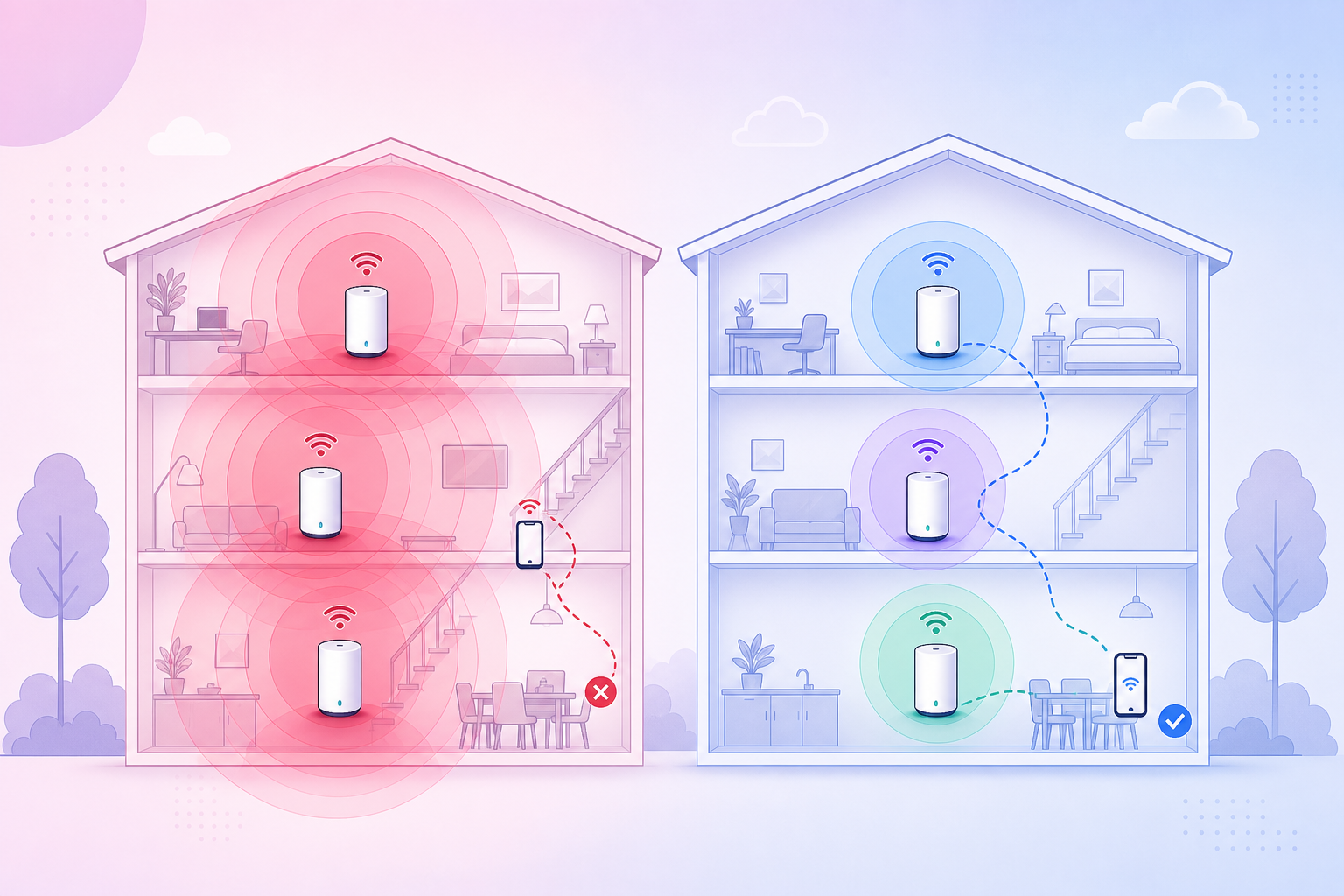
When I increased the transmit power of the Mesh node to the maximum, the node could indeed cover a larger area. However, a phone, sensor, camera, or small IoT device might not transmit back strongly enough at that distance. As a result, the device still sees the SSID, still tries to cling to the distant node, but the actual transmission line is weak, with many retries, fluctuating ping, and unstable speeds.
This is why there are times when the signal doesn't look too bad, but devices still lag, drop connections, or respond slowly.
Mesh needs just enough coverage, not as much overlap as possible
In a Mesh system, nodes need to overlap so devices can roam. But too much overlap also causes problems.
If all nodes transmit at maximum power, a device in the middle of the house might see multiple nodes simultaneously with nearly equal signal levels. At that point, it has no clear reason to leave the old node, or it might bounce back and forth between nodes due to slight signal fluctuations.
Many people think the Mesh controller will decide everything, but most roaming decisions still lie with the client device. The controller can suggest, kick the client, or optimize band steering depending on the system, but phones, laptops, cameras, or IoT devices still have their own logic. A weak client or poor firmware might cling to a distant node for a long time, even if a closer node is better.
Therefore, the goal is not to make every node cover as far as possible. The goal is for each node to cover its proper area, with just enough overlap at the edge of the coverage zone, avoiding situations where nodes compete with each other for the same device.
The highest channel is not always the best
I also used to choose the highest channel with a simple thought: neighbors usually use common channels, so choosing a higher channel would result in less overlap.
This approach is sometimes true, but not correct by default.
With 2.4 GHz, the three most easily controlled channels are 1, 6, and 11 because they have less overlapping with each other. If you choose channels in between, for example, 3, 4, 8, 9, you might not be on the exact same channel number as your neighbors, but you will suffer from spectral overlap with more networks. It might look like a "different channel" on a scanning app, but the actual interference is still high.
With 5 GHz, high channels might involve DFS depending on the device, country, and firmware. DFS helps provide more channels to use, but if the AP detects radar signals or is forced to check the channel, it might change channels or temporarily pause broadcasting for a short period. With some devices, especially IoT or older devices, high/DFS channels are also not always as compatible as the more common channel groups.
In short: choosing a channel should be based on the actual environment, real devices, and stability after use, and shouldn't just rely on the feeling that "the higher the channel, the less the clash".
Signs of an inappropriate power/channel configuration
A few signs I've encountered or should be aware of:
- Standing still in one place, but the device is sometimes fast, sometimes slow.
- Walking through rooms, the Wi-Fi doesn't switch nodes at the right time.
- Devices cling to a distant node even though a closer node has a better signal.
- Cameras, sensors, smart speakers, or IoT devices occasionally lose connection.
- Local network ping fluctuates erratically even when the Internet is not congested.
- Speed tests near the AP are good, but in the area between two nodes, they are very erratic.
- The controller reports frequent reconnects, roaming, or high retry rates.
If you only look at the number of Wi-Fi bars, it is very easy to draw the wrong conclusion. A strong signal with a lot of interference or poor roaming will still result in a bad experience.
How I would reconfigure it
If I had to configure it again from scratch, I wouldn't turn it up to the maximum right away. I would follow this direction:
1. Reduce the power of each node by area
Nodes placed close to each other should not both broadcast too strongly. For multi-story houses or houses with many rooms, you can start at a moderate medium/high level, then remeasure the coverage area.
The goal is that when standing near node A, the device sees node A clearly better, and when entering node B's zone, node B is clearly better. Do not let every node be "heard" everywhere with a mediocre signal level.
2. Prioritize wired backhaul if possible
If Mesh nodes have to communicate with clients while also using Wi-Fi to backhaul to the main node, interference and overlap will be much harder to control. With a wired LAN backhaul, the system is much easier to stabilize, as each node focuses on serving clients in its area.
Not every house can be wired, but if you are building/renovating or can run cables inside the walls, this is an investment worth making.
3. Choose channels based on actual scans
With 2.4 GHz, I would prioritize 1/6/11 and put adjacent nodes on different channels if the system allows manual adjustment. If the controller auto-optimizes channels, you should still check to see if it chooses strangely overlapping channels.
With 5 GHz, I would try common channel groups, monitor stability, and then try DFS/high channels if I really need more space. Don't just choose the highest channel and assume it is optimal.
4. Separate expectations between main devices and IoT
Phones, laptops, and TVs need speed and good roaming. IoT devices usually only need stability, decent latency, and no dropped connections.
If your house has many smarthome devices, sometimes it's better to keep 2.4 GHz stable, with rarely changed channels and moderate power, instead of trying to force everything to run at maximum settings. Some IoT devices are very sensitive to channel changes, band steering, or aggressive roaming.
5. Remeasure after each adjustment
Don't change too many things at once. Adjust the power of a group of nodes, use it for a few days, and see if devices still cling to the wrong nodes. Then adjust the channels. If the controller has logs for roaming, RSSI, retry rate, or client history, monitor those metrics.
A simple way to check is to walk around the house with your phone, open a Wi-Fi analyzer app or the Mesh dashboard, and observe which node the device is connected to and how the signal changes. The point to watch isn't just a strong signal, but whether the device switches nodes reasonably and maintains a stable connection.
Conclusion
With Wi-Fi Mesh, having many nodes, maximum power, and the highest channel is not always good. Sometimes the "strongest" configuration makes the system harder to roam, more susceptible to interference, and less stable.
After my experience, a better way to think is: just enough coverage, just enough overlap, clean enough channels, and letting each node have a clear service area.
A strong Wi-Fi signal is good, but stable Wi-Fi is what we need every day.