Connecting JK BMS Battery Management Board to Home Assistant via ESP32-C3 Using ESPHome
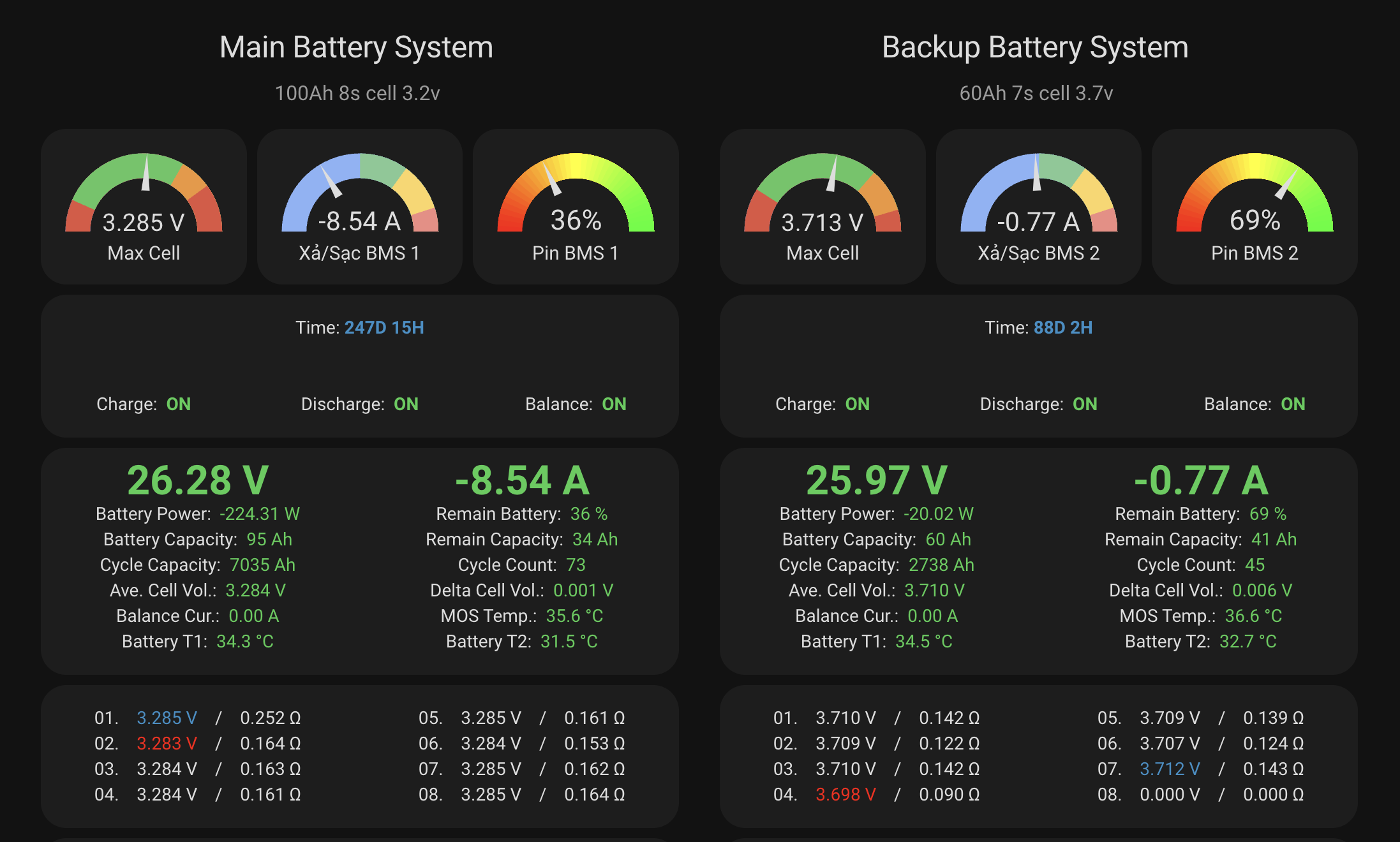
In this guide, we will explore how to connect the JK BMS battery management board to Home Assistant via ESP32-C3 using ESPHome. This allows you to monitor critical battery metrics such as cell voltages, charge/discharge current, temperature, and state of charge directly on your Home Assistant dashboard.
Requirements
- JK BMS board
- ESP32-C3 microcontroller
- Home Assistant installed and running
- ESPHome add-on in Home Assistant
Step-by-step Guide
1. Hardware Preparation
- Connect the ESP32-C3 to your computer via USB. Hold the BOOT button while plugging in to enter flashing mode.
- Access Home Assistant from this computer > Install ESPHome Add-on > Open the ESPHome dashboard.
2. ESPHome Configuration
In the ESPHome configuration, the most important parameter to configure is the Bluetooth MAC address of your JK BMS board (the bms0_mac_address variable).
How to Find the JK BMS Bluetooth MAC Address
You can retrieve the board's Bluetooth MAC address using any of the following methods:
Method 1: Scan with nRF Connect on mobile (Recommended - Fastest)
- Download and install nRF Connect for Mobile (or BLE Scanner) from the Google Play Store on Android (iOS devices obscure raw MAC addresses with randomized UUIDs, so Android is strongly recommended).
- Enable Bluetooth and Location (GPS) on your phone, then stand close to your battery pack.
- Open the app and tap Scan. Look for devices whose name starts with JK- (such as
JK-B2A...or any custom name you set in the JK app). - The MAC address in 6-byte hex format (e.g.,
C8:47:80:13:B4:A7) is displayed directly below the device name. Copy this address.
Method 2: Inspect ESPHome Logs
- Flash the initial ESPHome firmware to the ESP32-C3.
- Place the ESP32-C3 near your battery pack, open the ESPHome Dashboard in Home Assistant, and click Logs.
- The BLE scanner will output discovered Bluetooth devices along with their MAC addresses and advertised device names. Locate your JK BMS name to find the matching MAC.
Method 3: Check Hardware Label or the JK BMS App
- Many JK BMS batches feature a barcode sticker on the back of the board or packaging that prints the Bluetooth MAC address.
- Alternatively, in the official JK BMS Android app, check Device Info / Settings to retrieve the hardware Bluetooth address.
Flash YAML Configuration to ESPHome
- Create a new node configuration in ESPHome add-on.
- Paste the YAML code below and replace
bms0_mac_addresswith your actual MAC address:
Add Device to Home Assistant
• The ESP32-C3 device will automatically be discovered in Home Assistant
• Add the JK BMS entities to your dashboard
Create Dashboard
• Create a new dashboard in Home Assistant
• Add cards to display battery metrics:
• Gauge card for voltage and current
• Entity card for charging status
• Graph card for trend tracking
Conclusion
With this setup, you can easily monitor essential battery parameters from the JK BMS board directly within Home Assistant. This allows real-time tracking of battery health and early detection of potential cell anomalies.
Feel free to customize the configuration to suit your exact needs. Happy tinkering!