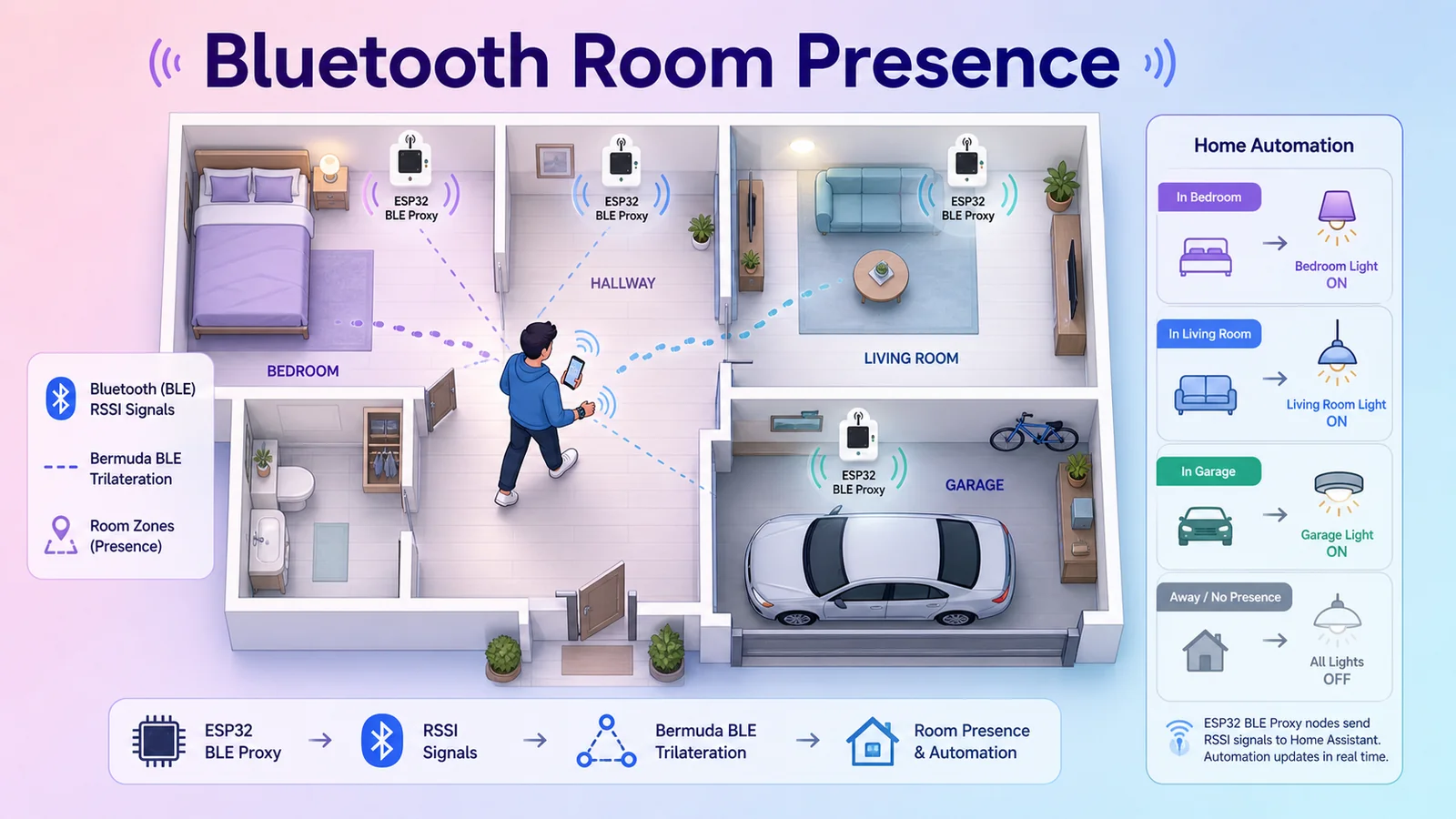
Zone Sensor Tracking Your Movement Across Rooms
Hãy thử tưởng tượng bạn di chuyển từ phòng ngủ qua phòng khách và muốn các thiết bị trong phòng ngủ tự động tắt, phòng khách tự động bật. Từ khóa: home assistant, docker, ai.
)
Imagine moving from the bedroom to the living room and wanting the devices in the bedroom to automatically turn off, and the ones in the living room to automatically turn on. Or when moving from the living room to the Garage during your usual commute time, the Garage door automatically opens.
In today's era, almost everyone carries some kind of electronic device, be it a smart phone, smart watch, or smart ring. In this project, I will use Bluetooth signals from these devices to determine a person's location in specific areas of the house with extremely high precision.
[!summary] One of the common misconceptions is that Bluetooth tracking projects often fail because this technology is limited by the number of times it can send signals within a certain period, making it prone to false tracking. With this project, I've managed to reduce the error rate to a minimum, and it has been running very stably for the past few months.
Implementation Idea
We need a device acting as a reader for the MAC addresses of Bluetooth devices to determine the distance based on RSSI. Similar to how bats locate targets while flying. Here, I will choose the ESP32-C2 board to run the firmware that reads Bluetooth signals.
There is a specialized project for this part here: [https://espresense.com/](https://espresense.com/). I have tried this project, but it has a weakness: it creates too many presence sensors for a single device, making it easy to appear in two rooms at the same time because both readers receive the signal, no matter how much I tried to calibrate the RSSI index. Because the nature of Bluetooth technology makes it easily obstructed by physical barriers, even a small change like putting the phone in a thicker pocket can alter the broadcast index reaching the receiver.
But what if we created a network of these Bluetooth signal readers so that the devices take turns receiving signals, similar to how WiFi Mesh works? That's the reason I looked into the concept of Bluetooth Proxy. [https://esphome.io/projects/index.html](https://esphome.io/projects/index.html)
Flash Bluetooth Proxy Firmware for ESP32
Requirements
- An ESP32-C2 or any ESP32 board that supports Bluetooth
- A USB Type-C or microUSB cable with data transfer support to connect the board to the computer
- Home Assistant on the latest version (Docker installation is fine)
- A beautiful soul to ensure success on the first try
Implementation Steps
- Hold the Boot or Flash button on the ESP board
- Click connect to proceed with connecting to the board and flashing. Remember to choose "Erase all"
- After flashing, wait a moment for the board to boot up, click next to connect to your home WiFi
- The web interface will report that the connection is complete
Plug in the cable while holding the button; if the light is off, you have successfully entered flash mode
)
Connecting the Board with HASS
Connecting the ESP32 Board with HASS
[https://github.com/esphome/esphome](https://github.com/esphome/esphome) Add the ESP Home add-on to easily manage these ESP boards, and it will also automatically connect to HASS.
)
Installing Bermuda BLE
Through HACS, proceed to install the integration called Bermuda BLE Trilateration, which helps combine these Bluetooth proxies and tracks Bluetooth devices in the area.
)
After downloading, go to Add Integration and add the Bermuda integration. Just click next a few times to finish the installation. Now for the configuration part.
Configuring Bermuda BLE Trilateration
Device Configuration
In the Select Devices section, click on it and select the devices that display clear names to proceed with tracking,
)
Once selected, it will display this device as a device containing basic sensors
)
In case the list doesn't show the device you want—usually Apple devices don't show up because they use Random MACs—you need to use the method below to get a secret code for tracking.
Finding the Bluetooth MAC Address
Using MacOS to find iOS/iPadOS/watchOS MAC Addresses:
- On MacOS, make sure you are logged in with the iCloud ID linked to your device.
- Launch the Keychain Access app.
- On the left sidebar, click on iCloud.
- In the top right search bar, type
bluetooth. - On your Apple Watch, go to Settings > About, scroll down to find the Bluetooth address, in the format:
XX:XX:XX:XX:XX:XX - Open each item to find the one associated with your Apple Watch. The Account field must match the Bluetooth address on your watch, in the format:
Public: XX:XX:XX:XX:XX:XX. - Paste the content into the form below and click 'Decode' to convert this content into an IRK. I am just translating the content and have attached the original instructions along with the tool so you can get the IRK code yourself [https://espresense.com/beacons/apple](https://espresense.com/beacons/apple)
Click on Show password. Enter your macOS password twice and copy the content.
)
A list will appear with the kind application password.
)
Enter this Private BLE Device code into the configured devices section and it will recognize the new device
[!tip] For Android, you just need to install the Home Assistant app and turn on the Beacon monitor sensor, which will immediately display the Transmitting ID code
)
Distance Configuration
Regarding the distance recognition configuration (Global Options). I use the configuration below, you can customize the parameters until you are satisfied.
)