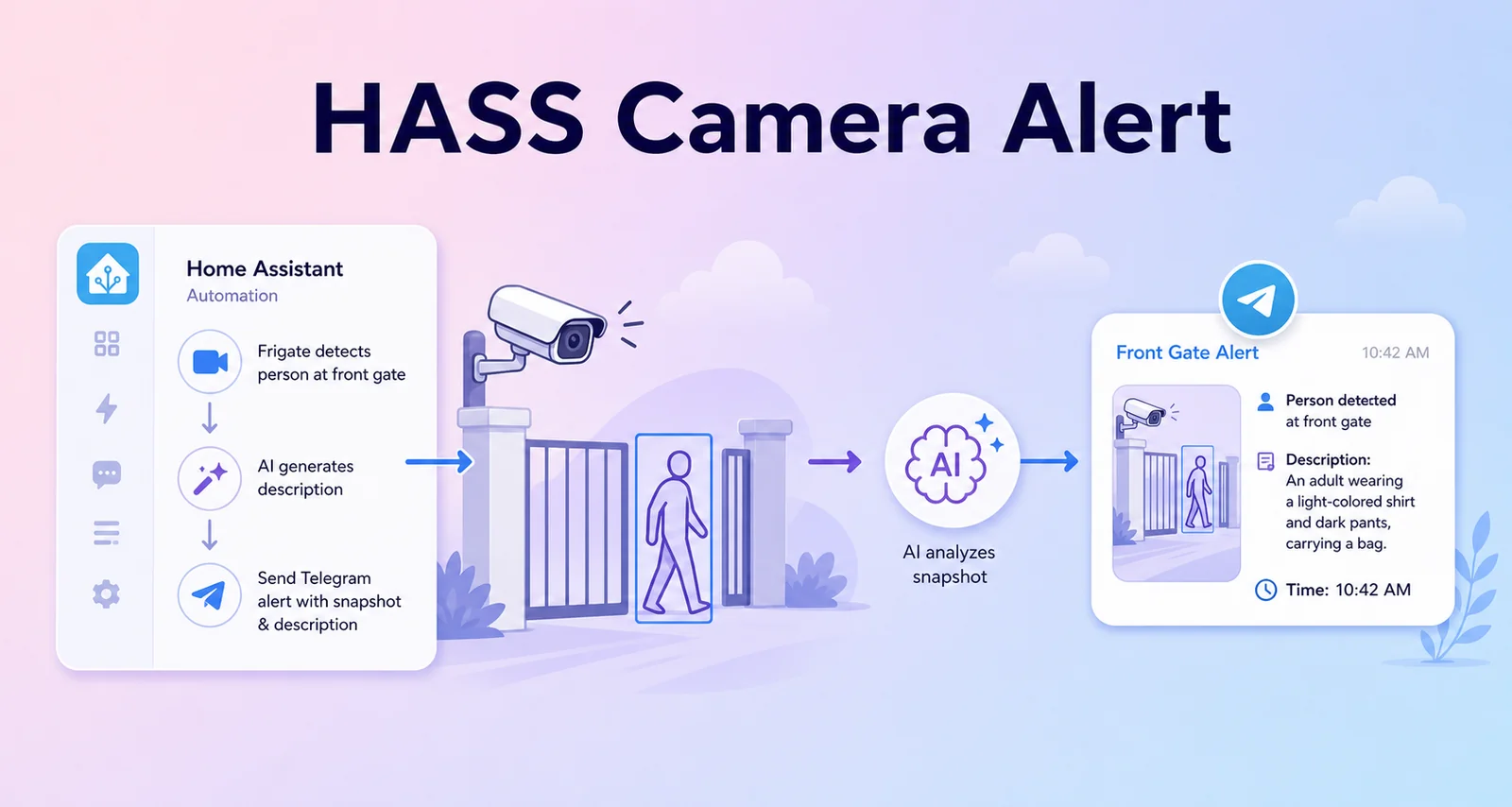
Send Telegram camera alerts with AI descriptions when Home Assistant detects someone at the gate
How I use Home Assistant, Frigate, AI Task, and Telegram to send camera alerts with a short AI description when someone is detected at the gate.
I do not want my home camera alerts to stop at "motion detected". Those alerts quickly become tiring because I still have to open the camera app, scrub through the clip, and decide whether anything important happened.
The flow I use now is:
- Frigate detects a person or an event near the gate.
- Home Assistant receives the event through MQTT.
- Home Assistant captures a snapshot or uses the Frigate clip.
- AI Task analyzes the camera image.
- Telegram receives a photo, video, or GIF with a short Vietnamese description.
Overall Architecture
Frigate camera event
    |
    v
MQTT topic: frigate/events
    |
    v
Home Assistant automation
    |
    +--> camera.snapshot / Frigate clip
    |         |
    |         v
    |     AI Task Gemini
    |         |
    |         v
    +----> Telegram alert
In my real Home Assistant setup, this flow uses:
- Frigate cameras:
camera.gate_camera,camera.garage_camera - Occupancy sensors:
binary_sensor.doorbell_person_occupancy,binary_sensor.gate_camera_person_occupancy,binary_sensor.garage_camera_person_occupancy - AI Task entities:
ai_task.gemini_flashandai_task.gemini_image_3 - Telegram actions:
telegram_bot.send_video,telegram_bot.send_animation,telegram_bot.send_photo - GIF shell commands:
shell_command.create_gate_gif,shell_command.create_gif
Telegram Configuration in Home Assistant
The Telegram notifier lives in configuration.yaml. For a public guide, keep it as a sanitized example:
notify:
  - platform: telegram
    name: telegram_home_notifications
    chat_id: YOUR_TELEGRAM_CHAT_ID

  - platform: telegram
    name: telegram_home_alerts
    chat_id: YOUR_TELEGRAM_ALERT_CHAT_ID
Do not publish the real bot token, chat ID, webhook URL, or private Home Assistant URL. Put those values in secrets.yaml, environment variables, or a private local configuration file.
Create a Shell Command to Build a GIF from Snapshots
I still like the approach of taking several snapshots and turning them into a short GIF. It gives me a quick view of what just happened without opening a longer clip.
In configuration.yaml:
shell_command:
  create_gate_gif: >-
    python3 /config/python_scripts/create_gif.py
    /media/snapshots/gate_snapshot1.jpg
    /media/snapshots/gate_snapshot2.jpg
    /media/snapshots/gate_snapshot3.jpg
    /media/snapshots/gate_motion.gif

  create_gif: >-
    python3 /config/python_scripts/create_gif.py
    /media/snapshots/garage_snapshot1.jpg
    /media/snapshots/garage_snapshot2.jpg
    /media/snapshots/garage_snapshot3.jpg
    /media/snapshots/garage_motion.gif
A minimal Python script:
from PIL import Image
import sys

image_paths = sys.argv[1:-1]
output_path = sys.argv[-1]

images = [Image.open(path) for path in image_paths]
images[0].save(
    output_path,
    save_all=True,
    append_images=images[1:],
    duration=500,
    loop=0,
)
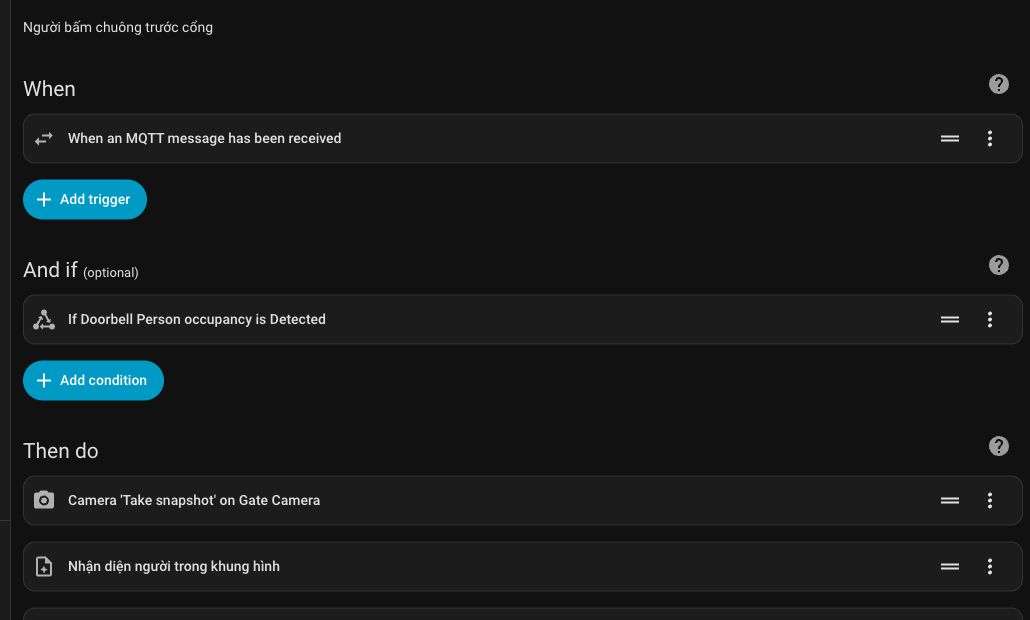
Main Automation: Person at the Doorbell Area
The real automation in my system is named Human at doorbell area. It listens to the MQTT topic frigate/events, but it only runs when the doorbell person occupancy sensor is on.
Here is a sanitized and shortened version:
alias: Human at doorbell area
description: Person at the gate
trigger:
  - platform: mqtt
    topic: frigate/events
condition:
  - condition: state
    entity_id: binary_sensor.doorbell_person_occupancy
    state: "on"
action:
  - service: camera.snapshot
    target:
      entity_id: camera.gate_camera
    data:
      filename: /media/snapshots/gate_snapshot.jpg

  - alias: Analyze person in frame
    service: ai_task.generate_data
    data:
      entity_id: ai_task.gemini_flash
      task_name: Person detection
      instructions: >
        Detect motion and describe it briefly in Vietnamese.
        If you see a person or vehicle, describe what they are doing,
        whether they are walking or riding, and any clearly visible shirt color.
        Do not describe static objects or buildings.
        If the cause is not clear, return:
        Camera phát hiện chuyển động ở cổng.
      attachments:
        media_content_id: media-source://camera/camera.gate_camera
        media_content_type: application/vnd.apple.mpegurl
    response_variable: generated_content

  - service: telegram_bot.send_video
    data:
      url: YOUR_HASS_URL/api/frigate/notifications/{{ trigger.payload_json["after"]["id"] }}/clip.mp4
      caption: "{{ generated_content['data'] }}"
      target: YOUR_TELEGRAM_CHAT_ID
      inline_keyboard: >
        Disable alert:/automation.human_in_doorbell,
        Send current image:/snapshot

  - delay: "00:10:00"
mode: single
The important detail is that the automation does not send a Telegram alert for every MQTT event. It also checks binary_sensor.doorbell_person_occupancy, which keeps the alert focused on people at the gate instead of unrelated Frigate events.
Helper Script: Snapshots, AI Description, and Telegram GIF
I also have a script named Gate - Snapshot, AI & Notification. It is useful when I want to send a short GIF instead of only a Frigate clip.
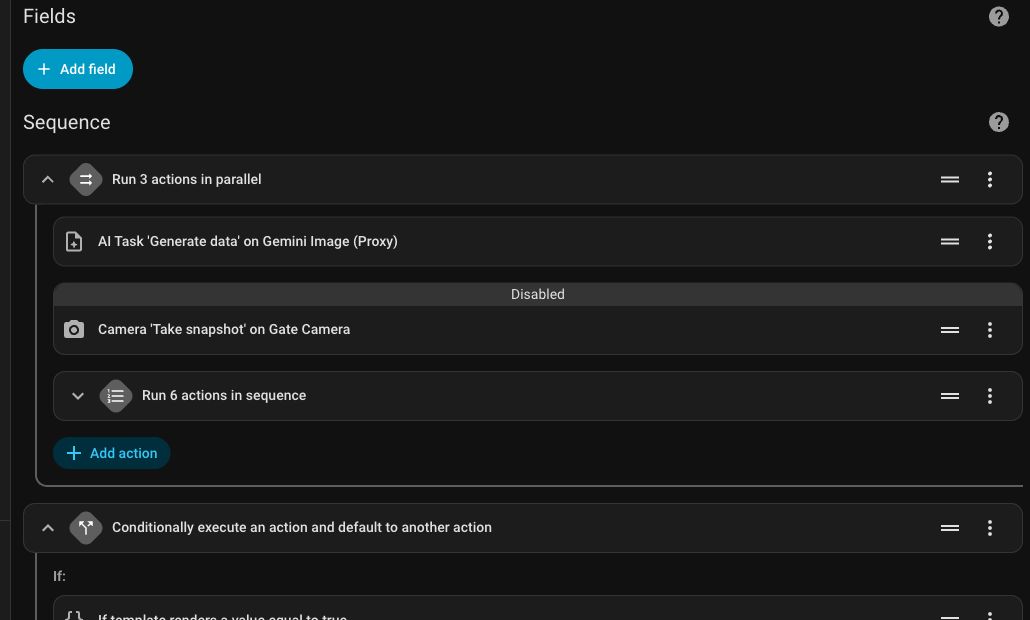
The script flow is:
- Run AI Task and the snapshot sequence in parallel.
- Capture three snapshots from
camera.gate_camera. - Combine them into
gate_motion.gif. - Stop if the AI does not see anything important.
- Send the GIF to Telegram when there is useful content.
Shortened version:
alias: Gate - Snapshot, AI & Notification
sequence:
  - parallel:
      - service: ai_task.generate_data
        data:
          entity_id: ai_task.gemini_image_3
          task_name: Detection
          instructions: >
            Analyze the entrance camera image.
            If you see a person or vehicle, return a very short description.
            Do not describe static objects, buildings, or irrelevant details.
            If you cannot identify anything unusual, return:
            Không phát hiện bất thường
          attachments:
            media_content_id: media-source://camera/camera.gate_camera
            media_content_type: image/jpeg
        response_variable: generated_content

      - sequence:
          - service: camera.snapshot
            target:
              entity_id: camera.gate_camera
            data:
              filename: /media/snapshots/gate_snapshot1.jpg
          - delay: "00:00:01.5"
          - service: camera.snapshot
            target:
              entity_id: camera.gate_camera
            data:
              filename: /media/snapshots/gate_snapshot2.jpg
          - delay: "00:00:03.5"
          - service: camera.snapshot
            target:
              entity_id: camera.gate_camera
            data:
              filename: /media/snapshots/gate_snapshot3.jpg
          - service: shell_command.create_gate_gif

  - if:
      - condition: template
        value_template: "{{ generated_content['data'] == 'Không phát hiện bất thường' }}"
    then:
      - stop: ""
    else:
      - service: telegram_bot.send_animation
        data:
          file: /media/snapshots/gate_motion.gif
          target: YOUR_TELEGRAM_CHAT_ID
          caption: "{{ generated_content['data'] }}"
mode: single
For security cameras, the AI prompt should stay short and strict. If the prompt is too broad, the model may start describing trees, walls, shadows, or static objects. What I need is a short sentence such as:
A person in a light shirt is standing at the gate.
Garage Variant
The garage uses the same idea with different entities and output files:
camera.garage_camera/media/snapshots/garage_snapshot1.jpg/media/snapshots/garage_motion.gifshell_command.create_gifscript.garage_snapshot_ai_notification_duplicate
The automation Ghi lại chuyển động khu vực nhà xe handles the routing:
- If
binary_sensor.gate_camera_person_occupancyis on, it calls the gate script. - If
binary_sensor.garage_camera_person_occupancyis on during the night window, it calls the garage script.
This keeps the "when should this run" logic separate from the "capture, analyze, and notify" logic.
Advanced Variant: Detecting Delivery Workers
Later, I added a dedicated flow for delivery workers. Instead of asking only "is there a person?", the AI asks:
How many delivery workers are standing at the gate?
The first automation reads the Frigate event, uses AI Task to count delivery workers, and stores the result in a counter:
alias: Count delivery workers at the gate
trigger:
  - platform: mqtt
    topic: frigate/events
condition:
  - condition: template
    value_template: "{{ trigger.payload_json['after']['label'] == 'person' }}"
action:
  - service: ai_task.generate_data
    response_variable: shipper_count
    data:
      entity_id: ai_task.gemini_flash
      task_name: Camera AI
      instructions: >
        Count the delivery workers standing at the gate.
        Use signs such as delivery uniforms, helmets, delivery bags,
        packages, or delivery motorcycles.
        Do not identify personal identity.
        Return exactly one line containing a number.
      attachments:
        media_content_id: media-source://camera/camera.gate_camera
        media_content_type: application/vnd.apple.mpegurl

  - if:
      - condition: template
        value_template: >
          {{ (shipper_count['data'] | regex_findall_index('([0-9]+)', 0) | int(0)) > 0 }}
    then:
      - service: counter.set_value
        target:
          entity_id: counter.shipper_count
        data:
          value: >
            {{ shipper_count['data'] | regex_findall_index('([0-9]+)', 0) | int(0) }}
      - service: camera.snapshot
        target:
          entity_id: camera.gate_camera
        data:
          filename: /media/snapshots/gate_snapshot1.jpg
The second automation only sends Telegram when the counter is greater than zero:
alias: Notify when a delivery worker is at the gate
trigger:
  - platform: numeric_state
    entity_id: counter.shipper_count
    above: 0
action:
  - service: telegram_bot.send_photo
    data:
      file: /media/snapshots/gate_snapshot1.jpg
      caption: AI detected a delivery worker at the gate
      inline_keyboard:
        - Capture gate and garage cameras again:/snapshot
This is useful because other automations can reuse counter.shipper_count, for example to play an announcement, show a dashboard card, or send a different notification to someone at home.
Verify in Developer Tools
After configuring the flow, open Developer Tools -> States and check these entities:
camera.gate_camera
camera.garage_camera
binary_sensor.doorbell_person_occupancy
binary_sensor.gate_camera_person_occupancy
binary_sensor.garage_camera_person_occupancy
automation.human_in_doorbell
script.garage_snapshot_ai_notification_duplicate
counter.shipper_count
When I checked the live state on June 13, 2026, the Human at doorbell area automation, the delivery-worker detection automation, and the delivery-worker Telegram notification automation were all enabled. script.new_script and script.garage_snapshot_ai_notification_duplicate were off, which is expected because they only run after a trigger. counter.shipper_count was 0, and the person occupancy sensors for doorbell, gate, and garage were all off.
One important detail: camera.gate_camera was unavailable during that check, while camera.garage_camera was still recording. This is exactly why I always verify Developer Tools before debugging YAML. Many alert issues are caused by a camera, entity, or integration becoming unavailable, not by the automation itself.
Operational Notes
- Do not send images when AI sees nothing clear
Use a fixed fallback such asKhông phát hiện bất thường, then stop the script when the AI returns that exact phrase. - Do not put internal URLs or tokens in messages
If you need to send a Frigate clip, use a Home Assistant protected URL and avoid hardcoding secrets. - Do not ask AI to identify personal identity
The prompt should describe actions, clothing, vehicles, person count, or delivery-worker signs. It should not guess who the person is. - Multiple frames are better than one frame
A single image can be blurry or capture the exact moment someone leaves the frame. Three images spaced one to three seconds apart usually help the AI produce a better description. - Separate automation from script
The automation decides when to run. The script decides what steps to execute. This makes the setup easier to debug and reuse.
Conclusion
The best part of Home Assistant is that I am not locked into one camera app or one AI app. Frigate handles detection, Home Assistant coordinates the workflow, Gemini/AI Task writes a short description, and Telegram delivers the alert.
Combined together, the security alert becomes much more useful: I can open Telegram and immediately know that someone is at the gate, see a clip or image, and read a short description before deciding whether I need to open the camera feed.